
Expired Domains in Microsoft 365: A Hidden Backdoor to Your Tenant
Microsoft 365 tenants typically use custom verified domains (like cybaa.io) for user identities and email addresses. Over time, domains may be retired, perhaps after a rebrand, acquisition, or project sunset, and their registrations allowed to expire. If such expired domains remain listed as verified in your M365 tenant, they introduce serious security risks.
An expired domain becomes a dangling reference to an asset your cloud tenant still trusts; but which you no longer control. In this post, we explore how attackers exploit these situations, including tenant-wide and Exchange Online risks, and provide best practices for domain lifecycle management.
Out of approximately 50,000 unique tenants scanned by Cybaa, there are over 20,000 verified domains which are no longer registered!
Tenant-Level Risks of Expired Domains
1. Unauthorized Account Creation via Expired Domains
If an attacker re-registers an expired domain still listed as verified in your tenant, they can potentially create a new Entra ID account. Microsoft 365 allows self-service sign-up for certain services like Power BI or Power Automate. If your tenant accepts email-verified sign-ups and the domain is still listed, a malicious actor can create a user like attacker@oldbrand.com and join your Entra tenant.
Though the account starts with minimal privileges, it provides a foothold for reconnaissance and lateral movement, for example in SharePoint where files have been shared with all users in the tenant.
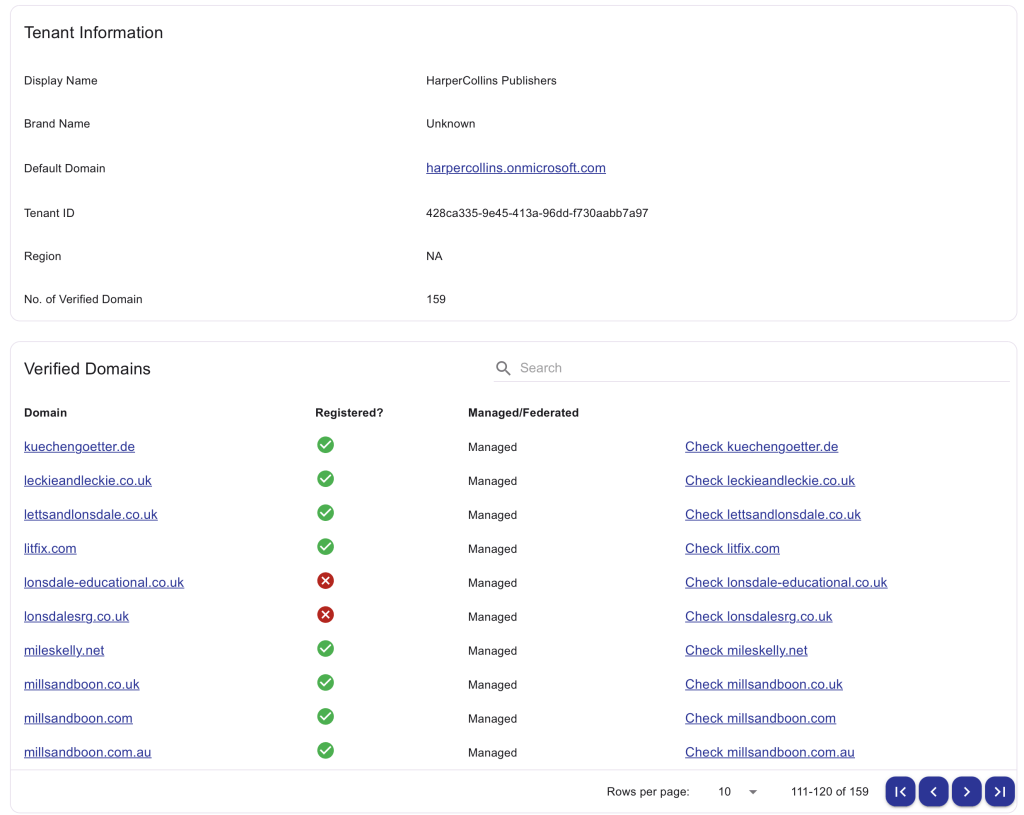
Cybaa’s Entra Tenant Discovery tool can be used to identify verified domains in Microsoft 365 tenants, making it easier to spot when a domain has expired but is still trusted.
2. Domain Ownership and Tenant Takeover
Microsoft’s tenant recovery and admin takeover processes rely on DNS-based domain ownership verification. If your tenant still trusts a domain that has expired and an attacker re-registers it, they could add DNS TXT records and impersonate your organisation during support or recovery procedures. This can result in unauthorised administrative access to your tenant.
Exchange Online and Email Risks
1. Email Spoofing and Brand Impersonation
A re-registered expired domain lets attackers send email as if from your company e.g., ceo@oldbrand.com. Recipients familiar with the domain might trust these emails, enabling phishing or fraud.
2. Bypassing Mail Protections with Attacker-Controlled DNS
With control over the DNS, attackers can publish SPF, DKIM, and DMARC records to make spoofed emails appear legitimate. If internal mail rules or allow-lists trust your own domains, spoofed emails from an attacker-controlled expired domain might be treated as internal.
3. Misrouted or Intercepted Email
If systems or users still send messages to addresses on an expired domain, attackers can receive them. For example, a legacy automation might send reports to reports@expired-domain.com, now routed to a malicious server. In hybrid setups, Exchange Online may relay mail to external MX records, aiding this attack vector.
Forwarding rules or auto-forwards to expired domains can also create data leakage channels. Microsoft Purview can help identify such configurations.
Best Practices for Domain Lifecycle Management
1. Renew or Park Important Domains
If feasible, keep renewing domains tied to your tenant – even if unused. The cost of renewal is minimal compared to the risk of domain hijacking. Alternatively, park them with a registrar you control and configure safe DNS settings. The UK NCSC has excellent advice for properly dealing with parked domains.
2. Remove Expired or Unused Domains Promptly
Remove unneeded domains from your M365 tenant as soon as they’re no longer required. Microsoft does not remove them automatically. Go to Settings > Domains in the M365 admin center and follow the process to remove any verified domains.
3. Audit and Monitor Verified Domains
Regularly review your verified domains list. Use tools to check WHOIS data and expiration dates. Services like Cybaa can monitor domains and alert you before expiry, and automatically detect changes to verified domains in your tenant. I’ve used Harper Collins as an example below:-
4. Disable Self-Service Sign-Ups
If your organisation doesn’t need email-based self-service sign-ups, disable them by setting AllowEmailVerifiedUsersToJoinOrganization to false. This prevents attackers from creating accounts using expired domains.
5. Leverage Microsoft Defender and Monitoring Tools
Use Microsoft 365 Defender and Identity Protection to detect abnormal sign-ins and domain spoofing. Configure anti-phishing policies to aggressively filter messages from known-retired domains. These tools can alert you to suspicious activity involving newly re-registered domains.
Conclusion
Expired domains in Microsoft 365 tenants are more than a cleanup issue, they represent a real security threat. If attackers reclaim a domain your tenant still trusts, they can infiltrate your Entra ID, impersonate your brand, and intercept internal communications. Proactive domain lifecycle management is essential to keep your M365 environment secure.
Audit now, remove what you no longer control, and close these hidden doors before someone else walks through them.
Protect Your Tenant with Cybaa
Cybaa continuously monitors your Microsoft 365 environment for domain-related risks, including expired verified domains, untrusted sign-ups, and domain takeover threats. Our Entra Tenant Discovery tool gives you visibility into what attackers can see from the outside, while our automated alerts and insights help you stay ahead of emerging risks.
Visit cybaa.io to learn more and start your free trial.
 Joe Tiedeman
Leave a comment